POS meaning
POS is the point of sale: the place and moment where a sale amount is calculated, paid, receipted and recorded.
Point of sale meaning and software path
POS means point of sale. It can mean the checkout moment, the software used to ring a sale, or the complete system that keeps the counter, stock, customers and reports in sync.
Posnic is point-of-sale software for retail, restaurant and service counters. Try the public demo without signup, download the free local edition for Windows, macOS or Linux, or create a cloud shop when remote access and sync help. Card authorization still needs a separate payment provider and tested terminal.
Quick answer
For most business searches, POS means point of sale. The useful question is whether the chosen POS can run the exact counter workflow, payment handoff, stock record and report the business depends on.
POS is the point of sale: the place and moment where a sale amount is calculated, paid, receipted and recorded.
The cashier adds items, the POS applies prices, tax and discounts, records payment, prints or sends a receipt, updates stock and saves reports.
A payment terminal authorizes cards or digital payments. POS software keeps the basket, inventory, customer and reporting record around it.
Common types include local POS, cloud POS, mobile or tablet POS, retail POS, restaurant POS, self-checkout and ecommerce-connected POS.
POS means point of sale: the counter, device, app and record path used to complete a customer purchase.
Read the full definitionPOS software is the app. A POS system includes hardware, payment handoff, network, backups, people and support.
Compare the termsCount software, devices, setup, payment fees, backup, support and downtime. Posnic keeps the local till free without cloud.
View cloud pricingSome workflows can continue locally. Test cash sale, receipt, stock update, close and later sync before relying on it.
Check offline POSRun one sale, correction, return, report, backup and restore using the exact computer, printer, scanner and network.
Use the scorecardOpen the sample shop for a fast look, download the local till for one counter, or create a cloud shop when sync helps.
Try the demoIntent map
Broad POS searches mix definitions, software, payment terminals and postal brands. Posnic is a point-of-sale software path for shops, restaurants and service counters.
Step-by-step workflow
A POS sale is not finished at the payment screen. Follow the transaction from register opening through receipt, stock movement, exceptions and day-end reconciliation.
Confirm the active register, cashier and opening responsibility before the first sale.
Check register setupOpen a new basket and identify the customer only when the business workflow needs one.
See sale entrySearch or scan products, then verify quantity, price, tax, discount and added charges.
See item scanningRecord the tender label, complete the sale and print or send the receipt. Card or wallet authorization remains with the separate payment provider.
See receipt optionsKeep voids, edits, returns, refunds and stock reversals tied to the original transaction.
See return workflowCompare sales, tender records, provider evidence, cash, receipts, stock exceptions and the day-end report.
See day-end reportingComponents and benefits
A POS system is more than a payment device. Match each component to a business outcome, then verify that outcome with your own products, staff, devices and payment provider before buying.
Builds the basket, applies prices, tax and discounts, records the tender label, creates the receipt and posts the sale. The practical benefit is a repeatable checkout record.
Inspect real Posnic screensComputers, printers, scanners, drawers, scales and customer displays help staff bill quickly. The benefit exists only when the exact models and failure paths pass a counter test.
Check hardware acceptanceCash, card, wallet or bank-transfer results must reconcile with the POS sale, receipt, refund and settlement record. The benefit is a traceable close, not merely a successful terminal message.
Review reconciliation controlsStock, purchases, customers, staff permissions and reports turn checkout data into daily controls. The benefit is earlier visibility into shortages, exceptions and owner decisions.
Compare POS capabilitiesEvidence note: this compact map responds to a dated broad-query observation; it is a buyer checklist, not a universal compatibility claim.
Buyer comparison
Broad POS searches can mean a register, payment machine, software app or complete checkout system. Separate the layer first, then test the workflow before buying.
| Search term | What it usually covers | What to verify before buying | Next step |
|---|---|---|---|
| Cash register | Sale totals, cash drawer, basic receipt and day total. | Whether stock, taxes, returns, users, backup and reports are still manual. | Try the free local till |
| Payment terminal | Card or wallet authorization at the counter. | How the paid amount matches the POS bill, stock record, receipt and settlement report. | Review POS system scope |
| POS app | Checkout screens for billing, items, customers, receipts and reports. | Printer, scanner, device, network, offline, backup and staff-role behavior on the real setup. | See product screens |
| Full POS system | Software, devices, payments, inventory, roles, backups, support and closing process. | One normal sale, correction, return, outage, restore and daily close recorded in the same scorecard. | Download the scorecard |
Buyer readiness
A serious POS buyer should know which counter workflow, device, payment and support facts must be tested. Use the gate below to choose demo, local install, cloud pricing or written scope without jumping too early.
Name item entry, tax, discount, payment label, receipt and stock update needs before opening a sample shop.
Try POS demo Download the POS demo script Download POS requirements briefConfirm outlet count, computer, printer, scanner, offline expectation, backup owner and who will test the day close.
Download local POSChoose cloud when dashboard access, branch sync, off-site backup or account-managed setup solves a named operating problem.
Compare cloud pricingShare data source, device models, payment route, target date, custom needs and the person who will accept the rollout evidence.
Request written POS quotePOS cost model
POS price is not only the monthly software line. Count the counter devices, setup work, payment route, backup, support and downtime before deciding that one quote is cheaper.
Compare local free use, cloud subscription, user or outlet limits, renewal terms and what happens when a paid plan stops.
View cloud pricingInclude item cleanup, import, receipt layout, tax setup, staff roles, device checks, training and one signed acceptance run.
Request written quotePayment fees, support, backup, internet dependency, recovery time and exit work can cost more than the app subscription.
Open ROI calculator| Cost area | What to include | What to ask before paying | Posnic route |
|---|---|---|---|
| Software | Free local edition, cloud subscription, extra outlets, users, renewal and cancellation terms. | Is the counter usable if cloud is not bought or renewed? | Pricing |
| Hardware | Computer, printer, scanner, cash drawer, scale, payment terminal, router and spare devices. | Which exact devices were tested, and who replaces them if they fail? | Hardware checks |
| Setup and migration | Products, opening stock, customers, tax, receipt, staff roles, imports, training and cutover support. | What is included in writing, and what work is outside the quote? | Written scope |
| Payments | Provider rates, transaction and terminal fees, settlement, failed-payment handling, refunds, chargebacks and exit terms. | Is the processor bundled or independent, and does payment success reconcile with the POS sale and bank record? | Processor comparison |
| Support and risk | Backup owner, restore test, downtime plan, support response, export path and future custom work. | What happens during internet, device, staff or vendor failure? | Offline tests |
Term clarity
Searches for POS full form, POS machine, EPOS, mPOS, cash register and payment terminal often point to different buying problems. Use the words below to compare quotes and pages without buying only one layer of the checkout workflow.
POS stands for point of sale: the sale point and record path where checkout, payment label, receipt and inventory movement meet.
A POS machine can mean a billing computer, tablet, card machine or all-in-one terminal. Ask which software, printer, scanner and support are included.
EPOS means electronic point of sale. In practice it usually means POS software plus digital records, reports and connected checkout devices.
mPOS means mobile point of sale, usually phone or tablet checkout. Confirm offline behavior, receipt printing and stock sync before using it on a live counter.
A cash register records sale totals. POS software adds inventory, customer records, reports, roles, receipt settings and backup options around the sale.
A payment terminal takes card or wallet payment. It is not the whole POS unless it also owns the basket, stock, receipt and reporting workflow.
Business examples
Searches for POS often become useful only after the shop type is clear. A retail store, restaurant, supermarket, service counter, mobile seller and multi-branch business all need the same sale record, but they test different failure points.
It scans or looks up items, applies price, tax and discounts, records payment labels, updates stock and shows the owner what sold.
Review retail POSIt connects table or counter orders, kitchen notes, bill edits, payment labels, receipts, service reports and staff accountability.
Review restaurant POSIt needs fast barcode billing, weighed or packed goods, price updates, stock receiving, cashier control, returns and day close.
Review grocery POSIt is the checkout app plus receipts, stock, staff permissions, backups, reports, payment reconciliation and a support owner.
Review small-business POSIt should connect service menu, job notes or appointment details, staff responsibility, deposits, final bill, receipt and owner reports.
Review service POS setupIt lets a seller bill away from a fixed counter, but device battery, network loss, card reader handoff, receipts and later sync still need testing.
Check mobile POS limitsVerify barcode lookup, price edits, tax, discount, receipt output, return handling and day-close reports before the counter depends on it.
Review retail POS Restaurant POSCheck table orders, kitchen notes, service counters, payment labels, bill edits and close reports with the exact service style.
Review restaurant POS Supermarket POSTest cashier speed, packed-item barcodes, stock receiving, price changes, low-stock checks and receipt accuracy on real devices.
Review supermarket POS Small business POSStart with sale entry, simple inventory, owner reports, backup discipline, support ownership and a clear path for future cloud needs.
Choose small-business POS Service business POSFor repair, salon, tailoring, clinic or service desks, test job notes, appointment or intake details, deposits, staff ownership and pickup records.
Plan service POS setup Mobile POSFor pop-ups, events, field sales or table-side billing, test battery, network loss, card reader handoff, receipt delivery and later stock sync.
Check mobile limits Offline POSSeparate local cash billing from card authorization, sync, ecommerce, messages and remote dashboard tasks that still need services.
Check offline limits Cloud POSUse cloud for branch sync, remote dashboards, backups and account-managed setup after the local counter workflow is already clear.
Compare online POSBenefits and tradeoffs
A POS can make checkout and records more consistent, but it also adds devices, setup work and dependencies that need an owner. Compare both sides before choosing a system.
Saved items, prices, tax rules, discounts and receipt steps can reduce manual calculation and give staff one sale process to follow.
Try the sale workflowA completed sale can update stock and feed customer, cashier and reporting records, making exceptions easier to trace than separate notes.
Inspect product screensComputers, printers, scanners, payment fees, setup, training, backup, support and replacement devices can outweigh the advertised app price.
Model total POS costPower, devices, network, payment services, permissions and sync can fail. Test each outage and a manual fallback before live use.
Review offline testsProduct fit boundary
Use published product facts to decide whether to test Posnic. A shortlist is not acceptance: verify the exact release, counter workflow, devices, payments and support path before rollout.
The free local edition runs on Windows, macOS and Linux, needs no Posnic account, and publishes its source. A public sample shop and optional cloud route let you inspect the workflow before paid setup.
Verify the local editionDo not assume built-in payment processing, a certified device bundle, a production ecommerce connector, onsite support or a service-level guarantee. Confirm each dependency in writing or compare a provider that already accepts it.
Ask Posnic to review fitEvidence boundary: these are screening conditions from current published product and runtime records, not a best-POS claim, customer outcome or guarantee. Review the product evidence.
Choose by operating need
Different visitors arrive with different intent. This page keeps each path close instead of making them search around the site.
Download the local Posnic app for daily billing. The local till is free forever without cloud; hardware and support costs are separate.
Download Posnic Cloud POSStart a cloud shop when remote dashboard access, backup, sync, demo data and account-managed setup help the business.
Start free trial DemoOpen the public sample shop and test roles, sale entry, stock and reports before creating an account or installing anything.
Open demo.posnic.io Buyer guideCompare software, hardware, offline behavior, payments, backups, evidence limits and acceptance checks before relying on a counter.
Read POS system guideSetup and custom work
When the question is no longer "what is POS" but "will this work in my shop", send the operational facts. Posnic can quote hourly or fixed-scope work for setup, migration, device checks, cloud onboarding or custom changes when fit and availability are confirmed.
Share country, business type, outlets, counters, data source, device models, payment setup and target date so Posnic can review fit.
Request setup help Written quoteAsk for scope, responsibilities, exclusions, price, dates, support window and acceptance tests before setup or custom work begins.
Request written scope Rollout checklistUse the implementation checklist to plan import, tax, receipt, hardware, payment, staff, backup and cutover acceptance.
Open rollout checklist Custom POS workName the workflow, expected output, owner, evidence and deadline. Posnic will reply with what can be scoped or what should stay outside the quote.
Start the conversationBefore ordering printers, scanners, drawers, scales or payment devices, record the exact make, model, revision, operating system, driver, firmware, cable, network, official manufacturer baseline, receipt output, barcode suffix and focus behavior, drawer or scale handoff, payment-terminal owner, failure recovery, supplier terms and owner decision.
Download hardware acceptance record Open hardware intent note
Use it as a blank exact-device record: the worksheet does not prove physical certification, local stock, pricing, warranty, onsite support, payment compliance, tax approval, hardware fit for every model, successful rollout or a Posnic ranking. It keeps one counter's device evidence visible before a buyer orders or accepts more hardware.
Before approving paid POS setup, keep the scope, source data backup, import sample, tax and receipt review, real devices, payment provider, staff tasks, pilot period, support path, rollback rule and clean restore in one acceptance record.
Download implementation acceptance record Open implementation intent note
Use it as a blank buyer record: the worksheet does not prove successful implementation, preserve every data field, certify hardware fit, replace tax or payment-provider review, guarantee staff readiness, or claim Posnic is the top product. It keeps the acceptance evidence visible before a buyer signs off.
Migration and cutover
A POS switch is not only a software install. Buyers need to know what leaves the old system, what is imported, how stock and payments reconcile, and when the business will stop or roll back if the first day does not close cleanly.
Record who can export products, customers, stock, balances, sales, payment reports and tax reports, plus the file format and row counts retained before any import.
Load a sample into a disposable shop, then compare identifiers, prices, tax settings, stock totals, customer balances and exceptions before the real cutover window.
Decide when to pause go-live, use manual receipts, keep the old POS open, or reschedule if devices, payments, reports, imports or backups do not pass.
Match POS totals, cash, terminal settlement, returns, stock movement, unresolved variances and owner approval before accepting the migration as live.
Use it as a blank buyer record: the worksheet does not certify a successful migration, protect every data field, replace accounting review, or claim Posnic is the top product. It keeps the export, import, rollback and first-day close evidence visible before a buyer approves the switch.
Staff go-live readiness
The first day depends on people as much as software. Before launch, record who can sell, who approves exceptions, who closes the day, who owns fallback steps and who decides whether the shop is really ready.
Name each cashier, manager, owner, admin and stock role, then test login, allowed actions and denied actions before the counter opens.
Use training data to practise barcode lookup, manual item search, discounts, returns, split tender, failed payment, stock lookup and receipt recovery.
Ask the owner or manager to read tender, tax, discount, stock and exception reports before approving staff for unsupervised selling.
Prepare manual receipts, escalation contacts, backup owner, first live sale watcher and rollback trigger before a queue forms at the counter.
Use it as a launch record: the worksheet does not prove training success, guarantee error-free staff, replace payment or tax review, or certify a safe go-live. It keeps role, practice, exception, close, fallback and owner-approval evidence visible before launch.
Day-close reconciliation
A POS buyer should prove that every completed sale, refund, payment result, outage and restored record can be matched across POS, payment provider, receipt or invoice, stock movement and close evidence before accepting the counter workflow.
Record the POS sale id, amount, cash tender, receipt or invoice, stock movement and shift close reference before the day is approved.
Keep provider references for approved, declined, cancelled, reversed and settled payments so the terminal record can be checked against the POS record.
Returns, refunds and duplicate retries should point to the original sale without creating unexplained payment, receipt or stock movement.
Outage notes, close totals and clean-restore evidence belong beside the buyer's acceptance decision, especially before migration, setup or custom work is signed off.
Use it as a blank buyer record: the worksheet does not prove settlement, prevent fraud, replace accounting, tax or payment-provider review, certify restore success, or claim Posnic is the top product. It keeps cash, card, refund, stock, close, outage and restore evidence visible before a buyer approves the POS workflow.
Security before rollout
A secure checkout depends on the deployed computer, accounts, network, payment provider, backups and operating process, not on a software label alone. Record each owner and test on the exact release and devices before live use.
Give each operator an individual account, restrict manager and admin work, remove leavers, and verify that cashiers cannot perform blocked actions.
Review employee access Release and updatesRecord POS, operating-system and device versions, verify the release source, and name who tests and applies security updates without disrupting the counter.
Verify current downloads Payment boundaryConfirm whether card data reaches the POS, terminal, browser or provider. Ask the payment provider which PCI responsibilities apply to the real deployment.
Inspect security boundaries Backup and responseKeep protected off-machine backups, test clean restore, record the security contact, and define isolation, recovery and notification decisions.
Run the restore disciplineSecurity boundary: this checklist is buyer preparation, not a security audit, PCI certification or guarantee. Review the exact deployment with the payment provider and qualified security or legal advisers where required.
Trust before payment
Before paying for cloud POS, setup or custom work, a buyer should know who publishes the software, what can be tried without payment, and how a transfer or checkout will be checked.
Posnic Innovations Private Limited is the named publisher. The About page links the historical DPIIT Certificate DIPP159427 and notes its recognition period ended 20 July 2026.
Review publisher record Try firstOpen the sample shop or download the free local till to inspect billing, receipts, stock movement and reports before choosing cloud or paid setup work.
Try sample shop Payment routeThe pricing page shows country, currency and available payment route. Manual transfers stay reported until Posnic checks the received payment evidence.
View payment options Written scopeFor migration, device checks or custom changes, request written scope, exclusions, price, timing and acceptance evidence before paying for the work.
Request written scopeBuyer acceptance
A polished POS demo is not proof that the real counter will reconcile. Run the same short evidence test on every shortlisted system, then keep the results beside the quote.
Record item selection, tax, discount, tender label, receipt output, stock movement and report visibility for the same sale.
Keep sale and receipt evidenceCheck whether duplicate sale, refund, return, cancellation and reopened-basket cases leave clean stock and money records.
Keep exception evidenceDisconnect internet, printer, scanner, payment or cloud access one at a time and write down exactly what still works.
Keep outage evidenceUse one scorecard for Posnic and alternatives. A high score should not hide a failed mandatory gate.
Keep the signed decisionFeature scope
Feature names are useful only when the shop can turn them into tested workflows. These are the areas a buyer should inspect.
| Area | What to verify | Posnic route |
|---|---|---|
| Checkout | Sales, returns, tax, discounts, payment labels, receipts and day close. | Product screens |
| Online and offline | Which workflows continue locally, which need cloud, and how records sync later. | Offline POS |
| Price and inventory control | Stock receiving, stock logs, price edits, low stock, item import and report reconciliation. | Evidence facts |
| Customer loyalty and marketing | Customer records, credit, repeat-buyer routes and shop-owned outreach plans. | Feature guide |
| Restaurant and kiosk | Tables, kitchen order tickets, QR ordering, kiosk and self-checkout acceptance paths. | Roadmap |
| Ecommerce and integrations | Online store, platform connections, e-invoice, tax submission and marketplace handoff boundaries. | Ask custom work |
| Setup choices | Business type, demo data, feature switches, receipt themes, branch defaults and staff roles. | Create trial shop |
| Support and trust | Publisher identity, source code, product facts, support limits and independent review route. | Trust Center |
See before deciding
These screens are product evidence and tour images, not customer deployment claims. Use them to decide what to test next.
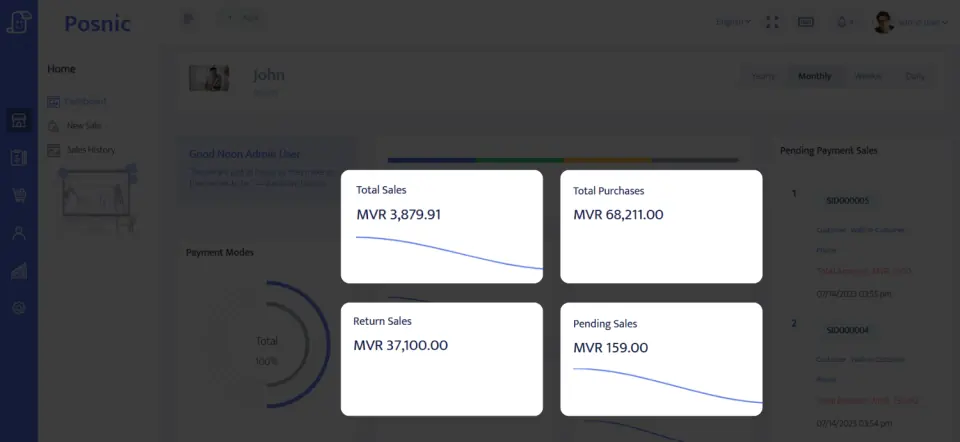
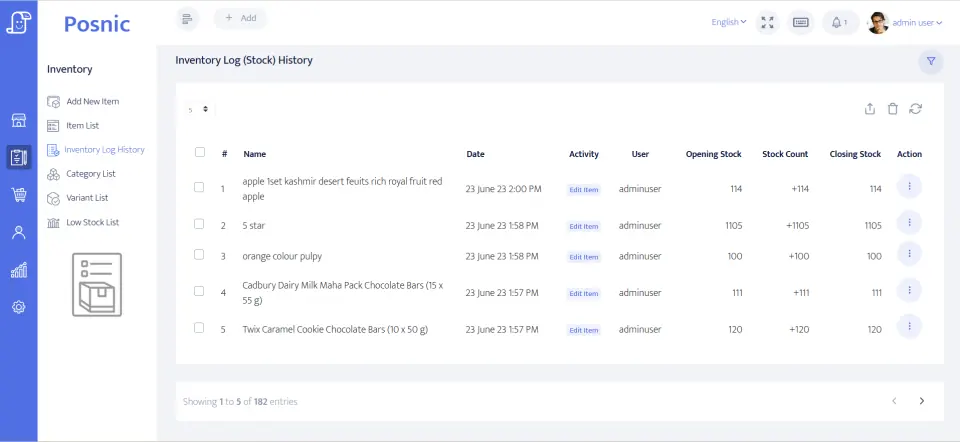
Trust and next step
Posnic is published by Posnic Innovations Private Limited. The site keeps a public source route, product facts, evidence limits and support boundaries so a buyer can inspect the software before paying or installing.
POS stands for point of sale. In business software, it usually means the checkout process and the software or system that records the sale.
A POS system builds the basket, applies price rules, tax and discounts, records the payment label, creates a receipt, updates stock and stores the sale for reports or cloud sync.
No. A payment terminal authorizes electronic payment. POS software records the basket, stock, customer and report trail around the sale.
The common POS types are local or offline POS, cloud POS, mobile POS, retail POS, restaurant POS, kiosk or self-checkout POS and ecommerce-connected POS.
In retail, POS connects product lookup or barcode scanning, prices, tax, discounts, payment labels, receipts, stock movement and owner reports.
In a restaurant, POS connects table or counter orders, kitchen notes, bill edits, receipts, payment labels and service reports.
In a grocery store, POS should support fast barcode billing, weighed or packed goods, price changes, cashier control, stock receiving, returns and day close.
For a small business, POS is the practical checkout setup: software, receipts, stock, staff permissions, payment reconciliation, backups, reports and support.
For a service business, POS should connect service items, appointment or job notes, deposits, staff responsibility, final billing, receipts and owner reports.
A mobile POS system lets a seller bill from a phone, tablet or portable device. Test battery, network, payment handoff, receipts and sync before relying on it.
Yes, if the chosen software supports local workflows. Posnic offers a free local till route without cloud and a separate cloud route for sync and remote access.
Compare software, hardware, setup, training, support, payment processing, backup, downtime and exit costs over the same period. Use written quotes for unknown numbers.
Yes. Send the shop workflow, data, device, payment and target-date details through setup help or quote request. Paid work starts only after scope, responsibilities, price and timing are accepted in writing.